

January 2026 Release Notes

Updated at January 28th, 2026
New Features
AI Conversation Summary for Emails
We’ve finished rolling out AI conversation summaries across all supported channels, including email.
Agents can now generate a clear, concise summary of an entire email thread in one click. Less reading, less typing, more time spent actually helping customers (and getting through the queue faster).

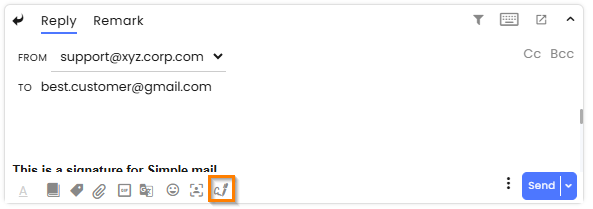
Selecting Forms from the Reply Box
Agents can now select a form directly from the reply box.
This makes it quicker to prefill and send forms without breaking the conversation flow.
Why it matters:
Less clicking. Faster replies. Happier customers.
Preferred Messaging Status
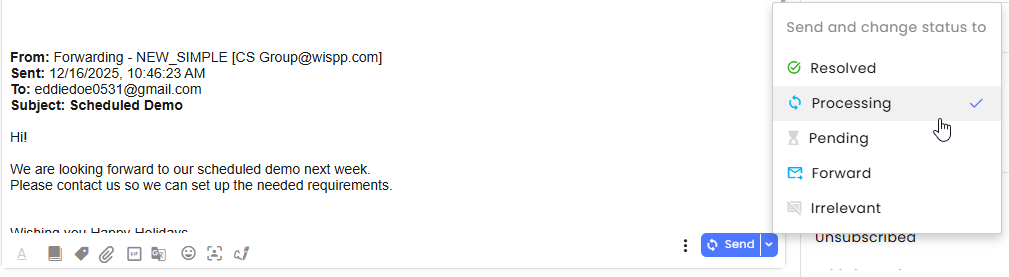
Agents can now save a preferred Send and Change Status To option.
Once selected:
- All future replies sent using Send will automatically apply the same status
- The selected status is shown on the Send button for quick confirmation
Why it matters:
More consistency. Fewer mistakes. One less thing to think about.
Enhancements
On-Demand Documents
Customers can now access previously signed forms at any time.
This is managed through the Forms module.
Why it matters:
No more chasing support for signed copies. Customers help themselves.

Flow Duplication
You can now duplicate a published AI Agent flow.
How it works:
- Open the three-dot menu and select Duplicate
- The duplicate keeps the original name with a timestamp added
- Both versions appear side by side in the AI Agents list
Why it matters:
Test changes safely without touching the live version.

Email Snippet
Agents can now see a snippet of the most recent email message directly in the conversation list.
Additional details:
- Unread snippets appear in bold, even if another agent has replied
- Only plain text is shown (images and HTML aren’t supported)
Why it matters:
Better context at a glance. Less confusion about what’s been read.

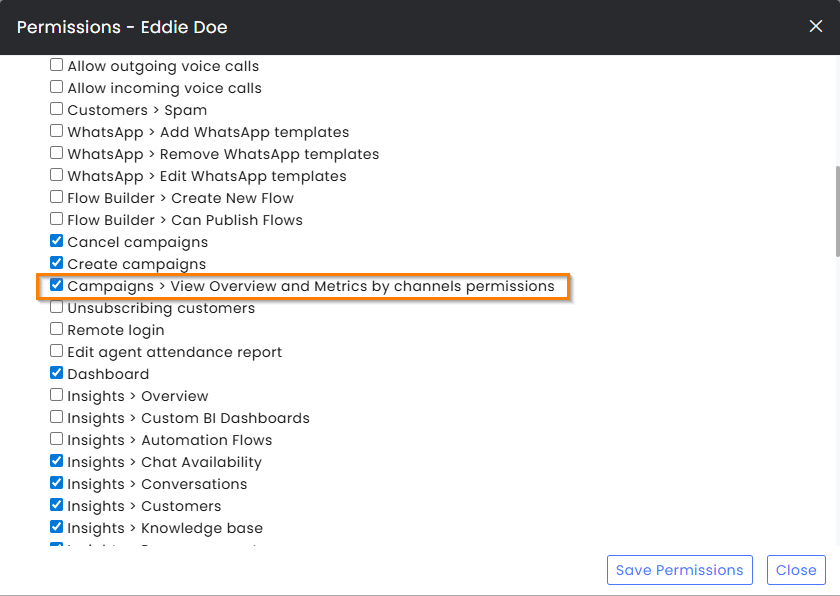
Channel-Based Campaign Permissions
Campaign Metrics can now be segmented by channel permissions.
Admins can:
- Limit agents to viewing only their permitted channels
- Give full visibility by enabling admin-level permissions
Why it matters:
Teams see only what matters to them. No noise. No crossover.
Channel Transfer Permissions
Admins can now restrict which channels agents can transfer conversations to.
With this change:
- Agents only see channels they’re authorised to use
- Routing errors are reduced
- Compliance is easier to manage

